![SUPPORT LOGO (1).png]](https://support.eukapay.com/hs-fs/hubfs/SUPPORT%20LOGO%20(1).png?height=26&name=SUPPORT%20LOGO%20(1).png)
💡 Tip: You can deposit crypto for intra-day trading (with temporary balance rules), or fiat to fund trades or payments. Both are supported directly from your dashboard.
Step 1: Access the Deposit Modal
- Navigate to the Balance section in the sidebar.
- Click the Deposit button.
Step 2: Choose Currency Type
The Deposit modal opens with two tabs:
- Fiat
- Crypto
✅ Select Your Currency Type
Click the tab that matches your deposit type:
- Fiat – for bank transfers (CAD, USD, EUR, GBP)
- Crypto – for blockchain-based deposits (BTC, ETH, USDT, etc.)
Step 3: Select Currency & Deposit Method
For Fiat Deposits:
Choose your desired currency (e.g., CAD, USD, EUR, GBP) from the dropdown menu.
Then select a deposit method based on your region:
|
CAD |
Wire Transfer, Bill Payment |
|
USD |
Wire Transfer, ACH |
|
EUR |
SEPA, SWIFT |
|
GBP |
BACS/Faster Payments, SWIFT |
👉 After selecting your currency and method, click Continue.
⚠️ Note: Some methods may require pre-approved bank details. If not set up, contact support.
For Crypto Deposits:
- Select the Crypto tab.
- Choose the cryptocurrency (e.g., BTC, ETH, USDT).
- The system generates a unique deposit address for your transaction.
🖼️ Screenshot: Deposit BTC modal with QR code and address field.
You’ll see:
- A QR code — scan it with your wallet app.
- A wallet address — copy it into your wallet manually.
- A “Confirm Funds Sent” button — use this after initiating the transfer.
Step 4: Send Funds from Your Wallet/Bank
For Cryptocurrency:
- Open your crypto wallet (e.g., Ledger, MetaMask, Coinbase).
- Scan the QR code or paste the address.
- Enter the amount you wish to send.
- Confirm the transaction.
📌 Remember: Only send what you intend to trade — any unused amount will be returned automatically after 24 hours.
For Fiat Currency:
- Initiate a bank transfer via online banking.
- Use the provided details (account number, routing, SWIFT/BIC, etc.)
- Ensure the correct amount and purpose (e.g., “Deposit”) are included.
Step 5: Confirm Your Deposit
For Crypto:
After sending funds:
- Return to the dashboard.
- Click Confirm Funds Sent in the Deposit modal.
- We’ll begin monitoring the blockchain for confirmation.
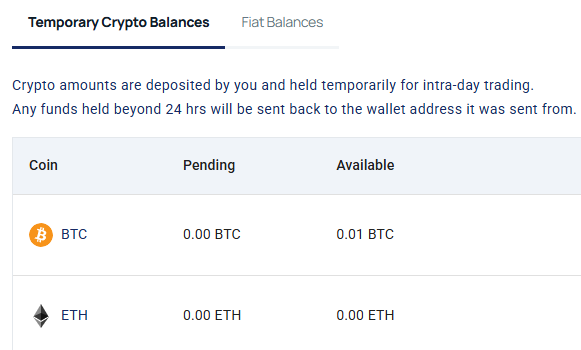
✅ Once confirmed, your funds appear as Temporary Crypto Balance and are available for trading immediately.
For Fiat:
No confirmation needed — we’ll track your deposit via bank records and update your balance once cleared.
Step 6: Monitor Your Balance
- Go back to the Balance page.
- Check under Temporary Crypto Balances or Fiat Balances.
- Wait for settlement (usually within 1–2 business days for fiat; instant on-chain for crypto).
⏳ Crypto deposits typically take 1–3 confirmations to process.
Important Notes
- 🔒 Never share your deposit address publicly — it’s unique and sensitive.
- 🔄 Crypto deposits are temporary — unused funds return to you after 24 hours.
- 🛠️ Need help? Contact support if your deposit isn’t reflected after 24 hours.